
Menu
A raised list of actions. It serves as a dropdown menu, opened under a trigger, and as a context menu, opened where the right button went down. You build rows between Begin and End from Item, Separator and Label, or from rows of your own.
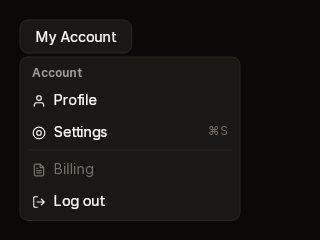
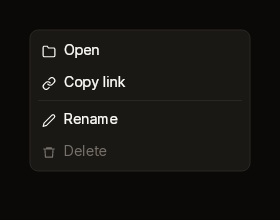
Fixtures: menu-dropdown and menu-context.
Begin, rows, End
public static MenuScope? Begin(BibuiRuntime runtime, string id, float x, float y, float width = 220f)
public static MenuScope? BeginBelow(BibuiRuntime runtime, string id, UiNode anchor, float width = 220f, float gap = 4f)

public static BibuiWidget MenuItem(
    this BibuiRuntime runtime,
    string id,
    ReadOnlySpan<char> label,
    string? icon = null,
    ReadOnlySpan<char> shortcut = default,
    bool disabled = false)
public static Box Separator(BibuiRuntime runtime)
public static Box Label(BibuiRuntime runtime, ReadOnlySpan<char> text)

// MenuScope
public BibuiWidget End();
Begin and BeginBelow return null while the menu is not open. It opens with runtime.OpenDropDown(id, anchor) and closes with runtime.CloseDropDown(id).
| Parameter | Meaning |
|---|---|
id (Begin) | The menu's dropdown. |
x, y | Where its top left goes, in window coordinates: for a context menu, the pointer's position at the right press. |
anchor | BeginBelow opens under this box where it was drawn last frame, with the left edges aligned. |
width | The menu's width. It is as tall as its rows. |
id (Item) | The row's retained box. |
icon | The name of an icon before the label. |
shortcut | Quiet text at the row's far end, such as ⌘S. |
disabled | A quiet row with no hover. It swallows the press. |
Claims and reports
- Each
ItemclaimsInteractionKinds.LeftPress, orDisabled, and returns its ownBibuiWidget: act onClicked. - The menu is one of the runtime's dropdowns. It is drawn over everything, and nothing beneath it gets a press where it was drawn.
End()claimsInteractionKinds.Pressfor the list after its rows, so a press on its padding or on a rule stops there. End()returns the list and its ownInteraction. It eats an Escape no one has eaten and closes the menu, so the Escape does not also close what is under it. Something built before the menu that reads keys has Escape first: leave it alone while the menu is open.SeparatorandLabeltake nothing.- A press closes the open menu when a box outside the menu and its anchor takes it, or when nothing takes it. The press still reaches the box that took it. A trigger opened it with itself as the anchor, so its own press leaves the menu to it: its click closes the menu. A context menu opened on a right press is opened again by the next one, wherever it lands, and so moves there.
State the caller owns
For a context menu, where it opens. The runtime keeps whether it is open. An item clicked is usually your cue to act and close the menu.
Theme tokens
- List: a
SurfaceRaisedfill, aBorderedgeruntime.Theme.Borders.Widthwide, and theruntime.Theme.Elevationoverlay shadow. - Item:
TextPrimarylabel and icon (TextDisabledwhen disabled), aSurfaceRaisedHoverhover fill, and aTextDisabledshortcut. Vertical padding is scaled byruntime.Theme.Density. - Separator:
Border. Label:TextSecondary, bold, at the small size.
Example
using Bibui.Core;
using Bibui.Core.Runtime;

sealed class AccountMenu
{
    const string Trigger = "My Account";
    const string Account = "Account";
    const string Profile = "Profile";
    const string Settings = "Settings";
    const string SettingsKey = "⌘S";
    const string LogOut = "Log out";

    public UiNode Build(BibuiRuntime runtime)
    {
        var trigger = runtime.Button("account-trigger", Trigger);
        if (trigger.Clicked)
            if (runtime.IsDropDownOpen("account-menu")) runtime.CloseDropDown("account-menu");
            else runtime.OpenDropDown("account-menu", trigger.Node);

        if (Menu.BeginBelow(runtime, "account-menu", trigger.Node) is { } menu)
        {
            Menu.Label(runtime, Account);
            bool chosen = runtime.MenuItem("account-profile", Profile, "user").Clicked;
            chosen |= runtime.MenuItem("account-settings", Settings, "settings", SettingsKey).Clicked;
            Menu.Separator(runtime);
            chosen |= runtime.MenuItem("account-logout", LogOut, "log-out").Clicked;
            menu.End();
            if (chosen) runtime.CloseDropDown("account-menu");
        }
        return trigger;
    }
}
For a context menu, ask about the area that opens it, and open the menu at the pointer on its right press:
using Bibui.Core;
using Bibui.Core.Runtime;

sealed class FileContextMenu
{
    const string Rename = "Rename";
    const string Delete = "Delete";

    (float X, float Y) _at;   // the caller's state: where it opens

    public UiNode Build(BibuiRuntime runtime)
    {
        Box area = runtime.BoxFromId("file-area", InteractionKinds.RightPress);
        var press = runtime.InteractionsFor(area);
        // The area's press closed an open menu; opening it again here moves it.
        if (press.RightPressed) { _at = (press.X, press.Y); runtime.OpenDropDown("file-menu"); }
        area.SizeX = SemanticSize.Pixels(320f);
        area.SizeY = SemanticSize.Pixels(200f);

        if (Menu.Begin(runtime, "file-menu", _at.X, _at.Y) is { } menu)
        {
            bool chosen = runtime.MenuItem("file-rename", Rename, "pencil").Clicked;
            chosen |= runtime.MenuItem("file-delete", Delete, "trash").Clicked;
            menu.End();
            if (chosen) runtime.CloseDropDown("file-menu");
        }
        return area;
    }
}